
TripJam
Making group trip planning more collaborative, playful, and effortless.
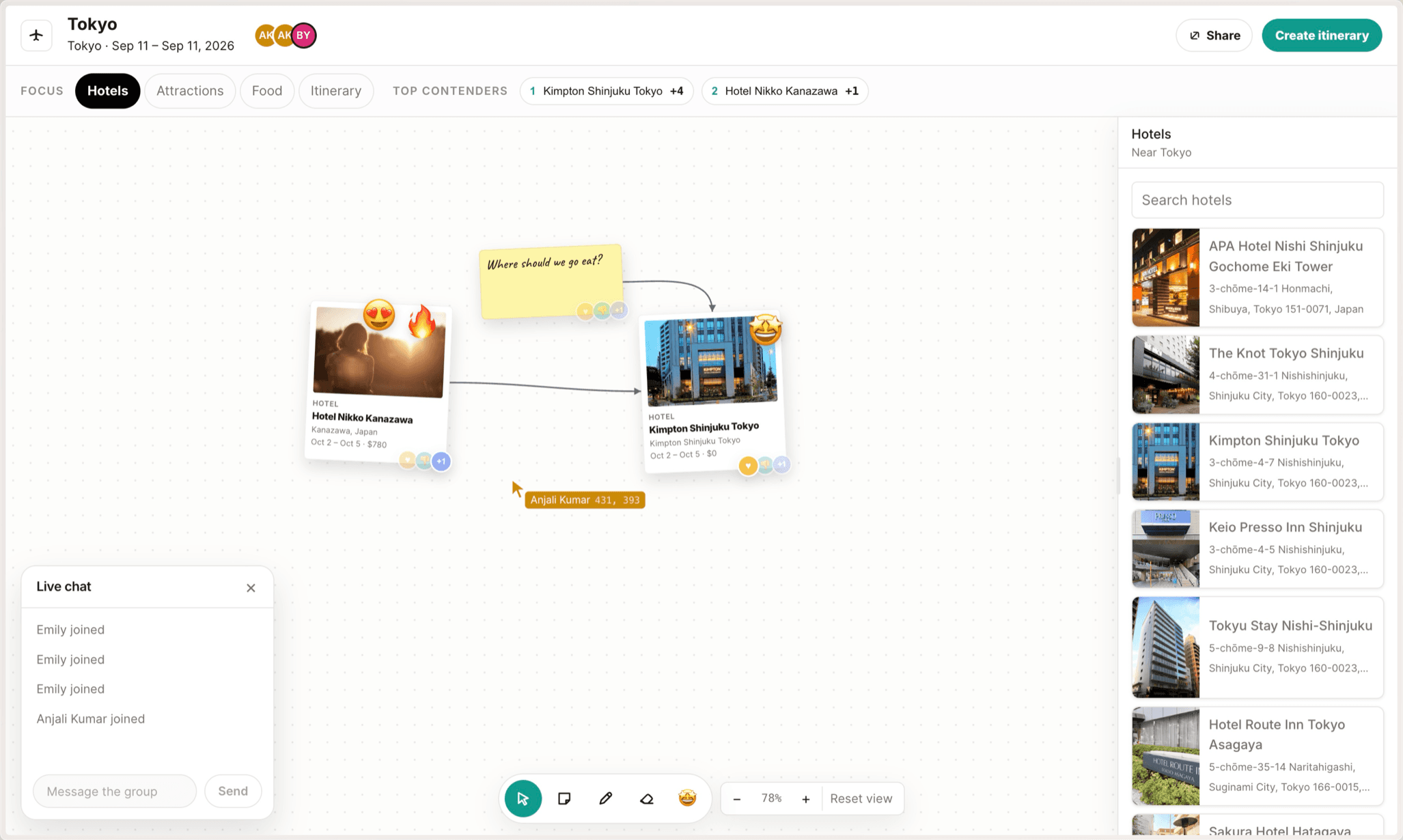
TripJam is a collaborative trip-planning canvas where friends can discover destinations, organize ideas, and turn their collective decisions into an AI-generated itinerary. Built during a 24-hour travel-themed hackathon at Carnegie Mellon University.
- My role
- Concept development, interaction design, front-end engineering
- Duration
- 24 hours
- Team
- Emily J., Quynh V., Anjali K.
- Context
- Travel-themed hackathon, Carnegie Mellon University
Making trip planning feel like part of the adventure.
Planning a trip with friends often means juggling Google Docs, Slides, messages, and in-person discussions. We wanted a more enjoyable way to explore and organize ideas together, instead of coordinating information across several tools.
How might we make group trip planning feel more like collaborative exploration and less like coordinating a document?
The board is the prompt.
Rather than build another itinerary manager, we imagined a shared canvas where friends collect destinations, arrange cards, vote on places, and collaborate in real time.
The key idea: let the planning itself give the AI its context. By reading the group’s selections, votes, and connections, TripJam can generate a structured itinerary without anyone re-explaining their decisions.
1Discover
Collect destinations and ideas.
2Collaborate
Arrange, discuss, and vote.
- IllustrativeDay 109:00Check in · Kimpton Shinjuku12:30Ramen · Fuunji15:00Meiji Jingu
3Generate
Transform the board into an itinerary.
Finding structure within freedom.
Our first design put flights, hotels, attractions, and other planning information on one canvas. It was flexible, but became overwhelming as information accumulated.
We tried dimming less relevant items to help people focus. The interface still felt cluttered. So we split the workspace into dedicated planning sections, keeping the canvas interaction while showing less at once.
- Conceptual reconstruction1Everything at full volumeflightSFO → NRThotelHotel AflightNRT → SFOsightMeiji JinguhotelHotel Bramen?foodRamensightteamLabflightTrainhotelHotel CfoodIzakayabook!
Iteration 1 · Unified canvas
Everything shared one space. Flexible, but crowded as items piled up.
- Conceptual reconstruction2Dimmed, still presentflightSFO → NRThotelHotel AflightNRT → SFOsightMeiji JinguhotelHotel Bramen?foodRamensightteamLabflightTrainhotelHotel CfoodIzakayabook!
Iteration 2 · Opacity filtering
Dimming less relevant items cut some noise, but the canvas still felt cluttered.
- Original screenshot3Focus tabs limit what is visible
Iteration 3 · Dedicated sections
Focus tabs separate planning categories: same canvas interaction, less on screen at once.
Open-ended interfaces still benefit from thoughtful constraints.
Bringing personality to the experience.
We wanted TripJam to feel like a space friends would enjoy using together, not another productivity app. I contributed to the interactions below, and treated them as one design language rather than a list of features.
- Placeholder · looping recordingHotelKimpton Shinjuku TokyoHotelKimpton Shinjuku TokyoEmily
Draggable, slightly tilted cards
Cards are rotated and offset a little, for a more informal feel.
- Placeholder · looping recordingAnjaliAndrewLive chatEmily joinedAnjali Kumar joinedMessage the group
Live, together
Real-time collaboration and live chat keep everyone in the same space.
- Placeholder · looping recordingCreate itineraryDay 109:00Check in · Kimpton Shinjuku12:30Ramen · Fuunji15:00Meiji Jingu
Board to plan
AI itinerary generation turns the board into a day-by-day plan.
These details gave the interface a tactile, approachable personality and contributed to a polished final demonstration.
From prototype to product in 24 hours.
Time was our greatest constraint. Design-focused teammates used Figma and Figma Make to rapidly explore the visual experience while development moved forward on the underlying functionality. We then brought the two together, updating the application to reflect the visual direction.
In collaboration with Emily J., Quynh V., and Anjali K.
One of my biggest technical challenges was integrating AI with the canvas context: translating selections, votes, and connections into structured information the model could interpret.
- CanvasSelections · votes · connectionsWhat the group did on the board.
- /api/itineraryStructured context for GrokBoard state translated into a form the model can read.
- ItineraryPublished to the roomEveryone sees the plan; it also exports as a PDF.
- React 19
- TypeScript
- Vite
- Liveblocks
- Google Places
- xAI Grok 4.6
The time limit pushed us toward quick, reversible decisions we could evaluate and refine, instead of chasing the perfect answer up front.
What we built, and what we learned.
Within 24 hours we had a working collaborative planning prototype: shared boards, destination discovery, voting, real-time interactions, and AI-generated itineraries.
- Shared boards
- Destination discovery
- Voting
- Real-time interactions
- AI-generated itineraries
We didn’t win the hackathon, but we were happy with the experience and what we created. Friends reacted positively to the demo, and some mentioned using FigJam to plan their own trips, which suggests a collaborative canvas is relevant to at least some travelers.
What I’d take forward.
Freedom needs structure.
Our canvas iterations showed that flexibility without enough organization creates unnecessary visual complexity.
Fast decisions enable faster learning.
Working within 24 hours taught me to make reversible decisions, build quickly, and refine through collaboration.
A polished prototype isn’t a complete solution.
We demonstrated the core concept, but real travel planning brings schedules, group preferences, and logistics we didn’t fully address.
Where I’d take TripJam next.
Improve onboarding
Help first-time users understand how to add destinations, use the canvas, collaborate, and generate an itinerary.
Support complex trips
Explore different arrival dates, individual availability, conflicting preferences, and day-by-day scheduling.
Validate the core experience
Test whether people enjoy planning with TripJam, and whether its itineraries accurately reflect their selections and constraints.
Two questions I’d want to answer
Does TripJam make planning a trip with friends more enjoyable than existing tools?
Can AI reliably translate a group’s ideas and constraints into an itinerary they trust?